



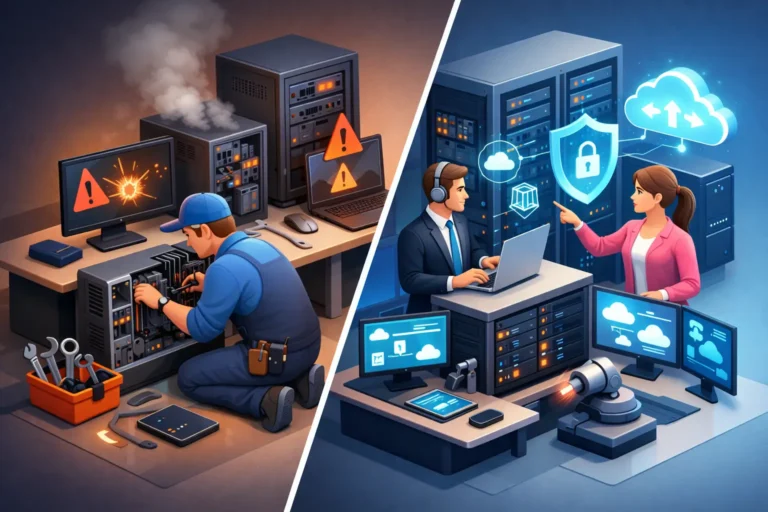
When the server goes down at 8:15 on a Monday, the real question is not just who can fix it. It is whether your business should still be operating in a break fix vs managed IT model at all. For small and mid-sized businesses, that choice affects downtime, cybersecurity, budgeting, and how much stress lands on your team when something goes wrong.
For some companies, break-fix support still makes sense. If your technology needs are minimal, your risk is low, and you can tolerate occasional disruption, paying only when something breaks may feel practical. But for businesses that rely on email, shared files, line-of-business software, phones, cloud systems, and secure data every day, reactive support often costs more than it appears to.
What break fix vs managed IT really means
Break-fix IT is exactly what it sounds like. Something breaks, you call for help, and you pay for the repair. There is no ongoing monitoring, no regular maintenance built into the relationship, and usually no broader strategy behind the work. It is a transactional model.
Managed IT works differently. Instead of waiting for problems, a provider monitors systems, applies updates, checks backups, helps protect against threats, and supports users as part of an ongoing service. The goal is not just to repair issues but to reduce how often they happen in the first place.
That difference matters because most IT problems do not begin as dramatic outages. They start small – missed patches, aging hardware, weak passwords, failed backups, unusual login attempts, storage warnings, or network slowdowns. In a break-fix setup, those warning signs may sit unnoticed until they become expensive.
The appeal of break-fix support
There is a reason some businesses still choose break-fix. On the surface, it feels simple and cost-conscious. If nothing is wrong, you are not paying for support. For a very small office with a handful of devices and limited compliance or security concerns, that can seem reasonable.
It also appeals to organizations that do not want a monthly contract or believe they use so little IT support that proactive service would be unnecessary. If your environment is stable, lightly used, and not central to revenue, break-fix can appear to offer flexibility.
The catch is that technology rarely stays simple for long. A small office today may rely on cloud apps, remote access, internet-based phones, shared documents, and customer data that all need protection. Once IT becomes essential to day-to-day operations, the reactive model starts showing its limits.
Where break-fix starts to cost more
Break-fix pricing can look cheaper because the invoice only appears when there is a visible issue. What it does not capture well is the cost of interruption.
If your office cannot access files for half a day, your staff is still on payroll. If your phones are down, clients cannot reach you. If a dental office loses access to scheduling software or a legal office cannot open documents before a deadline, the damage is operational as much as technical.
There is also the issue of urgency. Emergency support usually comes with pressure, limited options, and little time for thoughtful planning. You are solving the immediate problem first, which is necessary, but not always the most efficient or cost-effective way to run technology.
Security makes the gap even wider. Many of the biggest business IT losses do not come from hardware failure. They come from ransomware, account compromise, poor backup practices, and unpatched systems. Break-fix service often responds after the event. By then, the real costs may include recovery work, lost data, downtime, and damage to client trust.
Why managed IT is built for continuity
Managed IT is better understood as operational support, not just tech support. It is designed for businesses that need systems to stay available, secure, and predictable.
That usually includes ongoing monitoring, patch management, endpoint protection, backup oversight, user support, network health checks, and planning around hardware lifecycle and risk. Some providers also include cybersecurity services such as ransomware protection, dark web monitoring, and guidance on secure access controls.
This proactive approach changes the conversation. Instead of asking, “How fast can someone get here after a failure?” you start asking, “How do we reduce failures, shorten disruptions, and prevent avoidable risk?”
For a professional office, that shift is significant. A doctor, lawyer, contractor, or shop owner does not want to spend time deciding whether a firewall update was missed or whether backups actually ran. They want confidence that someone is paying attention before there is a problem.
Break fix vs managed IT on budget and planning
One of the clearest differences between break fix vs managed IT is financial predictability.
Break-fix costs are irregular. You might go months with very little spend, then suddenly face a major bill because a server fails, a workstation issue spreads, or a security incident needs urgent cleanup. That makes budgeting harder, especially for growing businesses trying to control overhead.
Managed IT usually moves support into a consistent monthly cost. That does not mean every expense disappears. Hardware replacements, major projects, and special upgrades may still be separate. But your core support becomes easier to forecast, and that matters when you are planning growth, staffing, or new systems.
The more important point is that predictability supports better decision-making. When your IT provider is already involved, there is more room to plan upgrades before equipment becomes unreliable, improve security before an incident, and align technology with how your business actually runs.
Security is where the models separate fastest
If your business stores client records, financial data, health information, or even just years of operational files, cybersecurity is not optional. In that environment, reactive support is often too narrow.
Managed IT does not guarantee that nothing bad will ever happen. No honest provider should claim that. What it does offer is an environment with more visibility, more maintenance, and more layered protection. Systems are watched, updates are addressed, suspicious activity is more likely to be noticed, and backups are more likely to be checked before a crisis.
That matters because recovery depends on preparation. A backup that was never tested is not much comfort after encryption hits. An antivirus product that was installed years ago but never reviewed may not reflect current threats. A user account with weak access controls can turn a simple phishing mistake into a larger breach.
For businesses in regulated or reputation-sensitive fields, managed service is often the more responsible model simply because the stakes are higher.
When break-fix may still be the right fit
Not every organization needs full managed services right away. A small business with limited devices, low compliance demands, and a high tolerance for occasional downtime may still prefer break-fix support. The same can be true for a home user or a microbusiness with straightforward needs and a tight budget.
The key is to be realistic. If you choose break-fix, it should be because the model truly matches your risk and operating needs, not because no one has explained the trade-offs clearly. Saving money on monthly support does not help much if one serious outage wipes out that savings.
There is also a middle ground. Some organizations begin with targeted services such as backup management, security monitoring, or support for a specific system while keeping other work on an as-needed basis. That can be a practical step for businesses that are not ready for a broader managed plan but know they need better protection in critical areas.
How to decide which model fits your business
A useful test is to ask what happens if your systems are unavailable for four hours. If the answer is lost revenue, missed appointments, production delays, or client service problems, your business is already too dependent on technology for a purely reactive model to be comfortable.
You should also look at how sensitive your data is, whether your team works remotely, how often you rely on cloud applications, and whether anyone inside the business has time to stay on top of updates, backups, access control, and vendor issues. Most growing businesses find that these responsibilities do not stay small for long.
That is why many service-based companies eventually move toward managed support. They are not buying technology for its own sake. They are buying fewer interruptions, clearer accountability, and a better chance of keeping operations steady.
For businesses that need reliability day after day, managed IT is usually the stronger long-term choice. It creates fewer surprises, better oversight, and more room to focus on the work your business actually does. And if your current setup only gets attention after something fails, that may be the clearest sign it is time for a better plan.
